Managed service providers (MSPs)

A costed report for each client, showing what is at stake and justifying the work

For each of your clients, Predictra estimates the possible annual loss, as a range, and ranks the fixes by how much they reduce it. The remediation cost is calculated at your rates.

Organization: Your MSP Add a client

Client portfolio

Illustration — fictitious organization

Canadian dollars · typical year — bad year

ClientDomainAnalysis frequencyLast analysisOpen findings (critical · high)Possible annual loss
Client Aclient-a.example.comDailyOctober 7, 20260 · 2$6,000 – $70,000
Client Bclient-b.example.comWeeklyOctober 5, 20261 · 31 critical$18,000 – $280,000
Client Cclient-c.example.comWeeklyOctober 6, 20260 · 0$1,000 – $8,000
Predictra model — public sources

Your clients count on you

Your clients trust you with their security and expect a clear answer to “Now what?” Predictra helps you give it, client by client, with findings leadership understands.

  • Canadian Centre for Cyber Security
  • MSP: managed service provider, the term used by the Centre.
“Because of their expansive client networks and access to sensitive information, MSPs are attractive targets for cybercriminals.”
Ransomware Threat Outlook 2025-2027 · January 28, 2026

What the MSP gets out of it

A recurring service, a business conversation with leadership and a costed remediation plan at your rates.

A recurring service to offer

Analyses repeat at your pace; the recalculated amount shows the effect of the work completed.

Read the details

Analyses repeat at the frequency you set for each client, and the recalculated amount shows the effect of the work completed: a service whose value is visible from one report to the next.
A business conversation with leadership

An amount and a plan to present to leadership, with the executive view summary.

Read the details

You present your client’s leadership with an amount and a plan, rather than a list of vulnerabilities. The executive view provides the summary.

A costed remediation plan at your rates

Hourly rate, fixed price or hours per intervention: your rates calculate remediation costs.

Read the details

You enter your service rates: hourly rate, fixed price or number of hours per type of intervention. One rate card for your MSP. Each remediation cost shows whether it comes from your rates or from a declared default rate.

You set your rates freely and are accountable for them to your clients.

An amount, an order, the evidence

The possible annual loss as a range, ranked fixes and the source of every number.

The amount

What a client’s exposure can cost in a year: a typical year and a bad year.

Read the details

What a client’s exposure can cost in a year, always as a range: a typical year and a bad year.

The order

Fixes ranked by the loss they remove; at equal effect, the cheaper one first.

The evidence

Every number traces to an observation, a cited public source or a declared parameter, with the calculation shown.

Read the details

Every number traces back to an observation from the analysis, a cited public source or a declared parameter, shown with the calculation.

One console for your whole portfolio

Your client portfolio with their indicators, a file for each client, creation of new clients and a switcher to move from one client to another.

  • A file for each client
  • Create new clients
  • Client switcher
Each client’s indicators

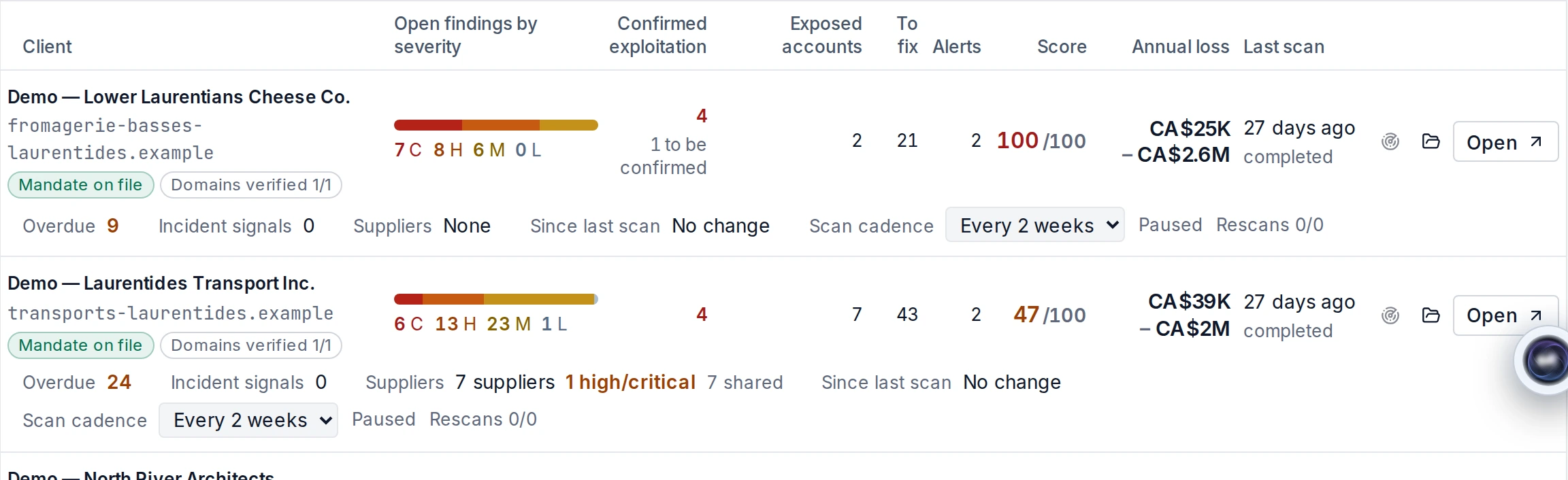
In your console, each client shows its loss range and its open findings.

In the platform
MSP portfolio of fictitious clients: findings by severity, confirmed exploitation, score, possible annual loss as a range, mandate and analysis frequency.
Sample dataPredictra model — public sourcesPossible annual loss: typical year — bad year

Vulnerabilities across all your clients

The portfolio shows findings by severity and confirmed exploitation, client by client.

  • Findings by severity
  • Confirmed exploitation

Analysis frequency, client by client

You set the analysis frequency for each of your clients, up to one analysis per day. The client cannot change it.

  • Up to one analysis per day
  • At a daily frequency, leaked credentials refresh once a week
  • Up to 10 reruns per client
Frequency, refresh and reruns

You set the analysis frequency for each of your clients, up to one analysis per day. The client cannot change it. At a daily frequency, leaked credentials refresh once a week.

You can also rerun an analysis: up to 10 reruns per client.

Alerts reach your team

When the daily watch finds a new known vulnerability (CVE), or an analysis reveals a new, reappeared or more severe vulnerability, the alert also goes to your team.

  • Application and email
  • Severity threshold and alert types chosen by each person
  • Immediate, daily or weekly digest emails
Triggers and individual preferences

When an analysis reveals a new, reappeared or more severe vulnerability, or when the daily watch finds a new CVE, the alert also goes to the MSP’s team. Each person chooses, for the application and email, the severity threshold and alert types, as well as the email frequency (immediate, daily or weekly digest).

Tickets in your tools

Findings are sent automatically as Jira or GLPI tickets, without duplicates, with a link back to Predictra.

  • Chosen severity threshold
  • As soon as the analysis ends
  • Without duplicates, with a link back to Predictra
Which findings are sent?

Only findings above the chosen severity threshold are sent, as soon as the analysis ends.

An executive view for each client

An MSP administrator can generate a client’s executive view: a summary generated from the facts of that client’s analyses.

  • Facts from the client’s analyses
  • Numbers inserted from the data
  • Automatic number checks
How the summary is generated

An MSP administrator can generate a client’s executive view: a summary generated from the facts of that client’s analyses. Its numbers are inserted from the data and checked automatically.

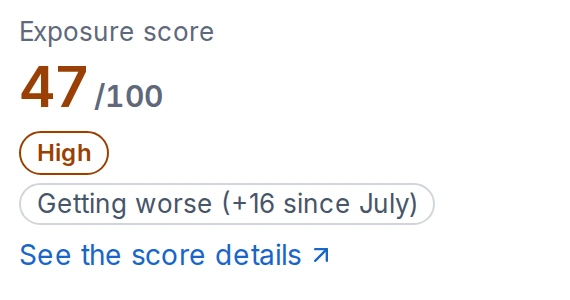
Outdated web server software on the extranet and tracking sites is the main exposure; a short, low-cost plan could remove most of the estimated annual loss.
Score de la vue dirigeant fictive, capture08.
Sample dataPredictra model — public sources

Your clients’ users

You manage your clients’ users yourself: invitation, role and deactivation. You consult your team’s log.

  • Invitation
  • Role
  • Deactivation
  • Your team’s log

Safeguards: the client’s mandate first

You analyze a client only after uploading its signed mandate, verifying one of its domains, then accepting the client yourself.

Conditions before vulnerability testing

A testing authorization letter, signed by your client and countersigned by you, before any vulnerability testing.

Proof of control of each of the client’s domains.

A register of your mandates and letters, to be produced on request.

01

Signed mandate

Upload the client’s signed mandate.

02

Verified domain

Verify one of its domains.

03

Your acceptance

Accept the client yourself.

Partner program: let’s talk

Are you a managed service provider who wants to offer Predictra to your clients? Tell us about your client base and how you work. We will present the MSP agreement and its terms.

  • Your client base and how you work
  • The MSP agreement and its terms
  • Rate card on request
Billing and responsibilities

Billing depends on the number of clients, the number of domains and the analysis frequency: rate card on request.

You remain responsible to your clients for the services, advice and rates you offer them.

Free scan or demo

A passive review of your own domain or a presentation of the platform and MSP console.

Free scan

A report with numbers on your own domain’s exposure, sent by email.

Read the details

A passive domain review from public sources; on screen, key findings and a preview of the loss range; the report follows by email.

Demo

A presentation of the platform and MSP console.

Read the details

A first look at your external exposure, guided by our team.

A presentation of the platform and MSP console

A costed report for each client, showing what is at stake and justifying the work.